 GRC Owl
Your weak spots are safe with us
A GRC system holds the most sensitive record a company keeps: where it's exposed. GRC Owl is built around isolation, strong sign-in, least-privilege access and an audit trail that is never purged.
A private instance
Each organisation gets its own instance on its own sub-domain, with a separate database, file storage and sessions. Each instance connects with its own database login, which can reach only its own database. Signing in to one never signs you in to another. Uploaded files can also live in your own cloud storage: OneDrive, SharePoint, Google Drive, Amazon S3 or SFTP.
Single sign-on
Sign in through Microsoft Entra ID, Google Workspace, Okta, Keycloak or any OpenID Connect provider. Sign-in can be limited to your e-mail domains, and passwords switched off entirely.
Two-factor & safe resets
Password users can add an authenticator app. Reset links are single-use, expire after an hour, are rate-limited, and never reveal whether an account exists.
Least-privilege access
Four roles set the baseline, then access narrows to the record: each risk register, issue and audit has its own list of who may see it. External auditors reach only their own audits.
Inspected uploads
Every file's real content is checked, not just its name. Executables and scripts are refused. Zip, tar and gz archives are opened and each entry is checked, which stops path tricks, hidden executables, nested archives and decompression bombs.
A permanent audit trail
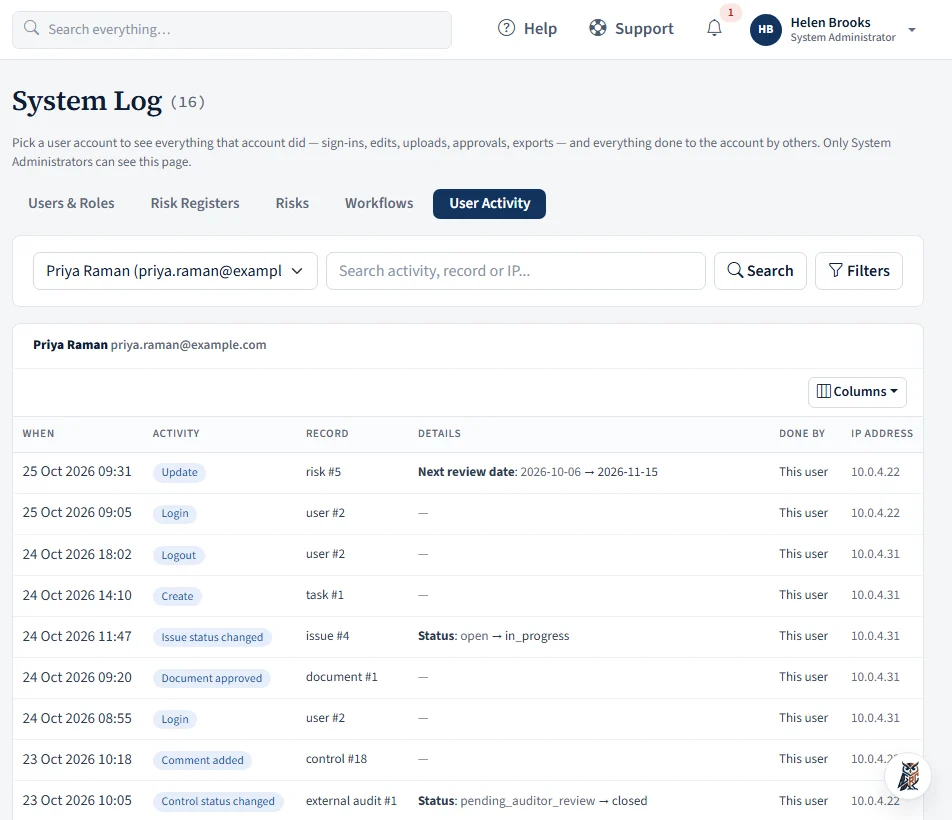
Changes, approvals, uploads and document downloads are logged with who and when, and never purged. The System Log covers users and roles, risk registers, risks and workflows, and a User Activity view shows everything one person did, with their IP address.
Backed up, exportable, never pooled
Your records are never mixed with another customer's. Instances are backed up and can be exported in full, including every evidence file and document.
- HTTPS only, with secure session cookies
- Files stored outside the web root and served only after a permission check, with stored file paths confined to the instance's own folder
- Optional file encryption: uploaded evidence and documents can be encrypted with AES-256, protected by a passphrase held by your System Administrator
- Optionally store uploaded files and backups in your own OneDrive, SharePoint, Google Drive, S3 or SFTP, chosen per instance by your administrator
- Integrations are read-only and managed by System Administrators and Compliance Managers; their credentials are encrypted with a per-instance key and never shown again, and are cleared if a connection is pointed at a different server
- Integrations and cloud storage will not connect to private or internal network addresses
- People pickers and @mention lists show names, not e-mail addresses; external auditors can mention only the people on their own audits
- Vendor questionnaire links are private to each contact; only a hash of the link is kept, and you can revoke one at any time
- Excel and CSV imports size-capped and checked for unsafe content before a preview
- Drafts and pending document versions private to the people involved
- Disabled accounts are refused at sign-in and never e-mailed
- Passwords are never written to any log
Who did what, and from where
Pick a person and see everything they did: sign-ins, edits, uploads, approvals and exports, with the record and the IP address. Switch to Users & Roles, Risk Registers, Risks or Workflows for the change history of each.
- Filter by activity type, record, IP address or date
- See what was done by a person, and what was done to their account
- Only System Administrators can open it, and entries are never purged
Questions we often hear
Is our data shared with other customers?
No. Each organisation has its own instance with a separate database, file storage and sessions.
Can we keep our files in our own cloud storage?
Yes. Each instance can keep uploaded files, and its backups, in OneDrive, SharePoint, Google Drive, Amazon S3 or an SFTP server you control, and move existing files across with a check. The database and sign-in sessions stay on the GRC Owl server.
Can we sign in with Microsoft, Google or Okta?
Yes. GRC Owl supports single sign-on with any OpenID Connect provider, including Microsoft Entra ID, Google Workspace, Okta and Keycloak. You can limit sign-in to your company's e-mail domains and turn password sign-in off. People need an account in GRC Owl first; nobody is created automatically.
Can our external auditors work in GRC Owl?
Yes. Give them the External Auditor role and add them to an audit. They see that audit's progress, controls, evidence and activity feed. When a control is submitted for review they approve it or request clarification, and they see nothing outside their audits. Removing them from the audit ends their access immediately.
AIDoes GRC Owl send our data to an AI service?
Only if you switch the optional AI assistant on. It is controlled by your administrator in the admin console, for the whole installation and for each instance, and it can be switched off at any time; with no key set, nothing is ever sent. When it is on, the text or file you are working on is sent to the AI provider (currently Google Gemini) to produce the answer, summary or suggestion. That covers Ask Owl questions, document and vendor-reply reviews, question suggestions, file summaries and workflow requests. Requests respect the signed-in person's permissions, and every call is logged without the content. Ask Owl, search and everything else work without it.
Will people be flooded with e-mail?
No. Each person chooses which of 16 alerts reach their inbox: assignments, reviews, approvals, @mentions, overdue items and more. In-app notifications are always kept.
Can we bring in our existing spreadsheets?
Yes. Controls, risk registers and action items can be imported from Excel or CSV using a template. Controls and risks show a full row-by-row preview, and nothing is saved until you confirm.
Can we change the workflow to match our process?
Yes. Administrators can add statuses, define transitions and who may make them, and set automatic triggers for audit controls, action items and issues, without any code changes.
Which frameworks are supported?
Seventeen, plus your own. Fifteen come with built-in control sets: ISO 27001:2022, ISO 42001:2023, ISO 27701:2025, PCI DSS 4.0.1, HIPAA, GDPR, DPDP 2023, NIST CSF 2.0, and India's SEBI CSCRF, four RBI frameworks, IRDAI Cyber Security and CERT-In Directions. SOC 1 and SOC 2 are ready for your own control set, imported from Excel or CSV.
What happens to our data if we leave?
Your instance can be exported in full, including documents and evidence files.
Have a security questionnaire for us?
Send it over and we'll answer it. Then use GRC Owl's Third-Party Risk module for the ones you send to your own vendors.
Contact us